Uptrends alternative: checks with the reason attached, wired by your coding agent
4 min read · published 2026-09-23
The pitch
Uptrends watches websites, transactions and servers from checkpoints around the world and reports load times in detail. It is an enterprise tool, built over two decades, and priced per monitor. This post is for the team that wants the reason for an incident on the same page as the alert: UpControl puts uptime checks, heartbeats, application logs and product events on one incident page, and a coding agent does the wiring with one npx command.
| Uptrends (as of 2026-09) | UpControl | |
|---|---|---|
| Free tier | a trial, no permanent free tier | 3 checks every 5 minutes, status page, logs and events |
| Paid from | tiers priced per monitor and feature set | $9/month annual ($11 monthly) |
| Checks on free | none outside the trial | 3 website checks per workspace; heartbeats free and uncounted |
| Status page | yes, built into the platform | free, one click, claimable, custom domain on paid |
| Logs and product events | no | yes, ingest endpoint plus SDK |
| Agent wiring | no | yes, npx upcontrol works with 10 coding agents |
| Self-hosting | no | yes, AGPL-3.0, one compose file |
Where UpControl is better
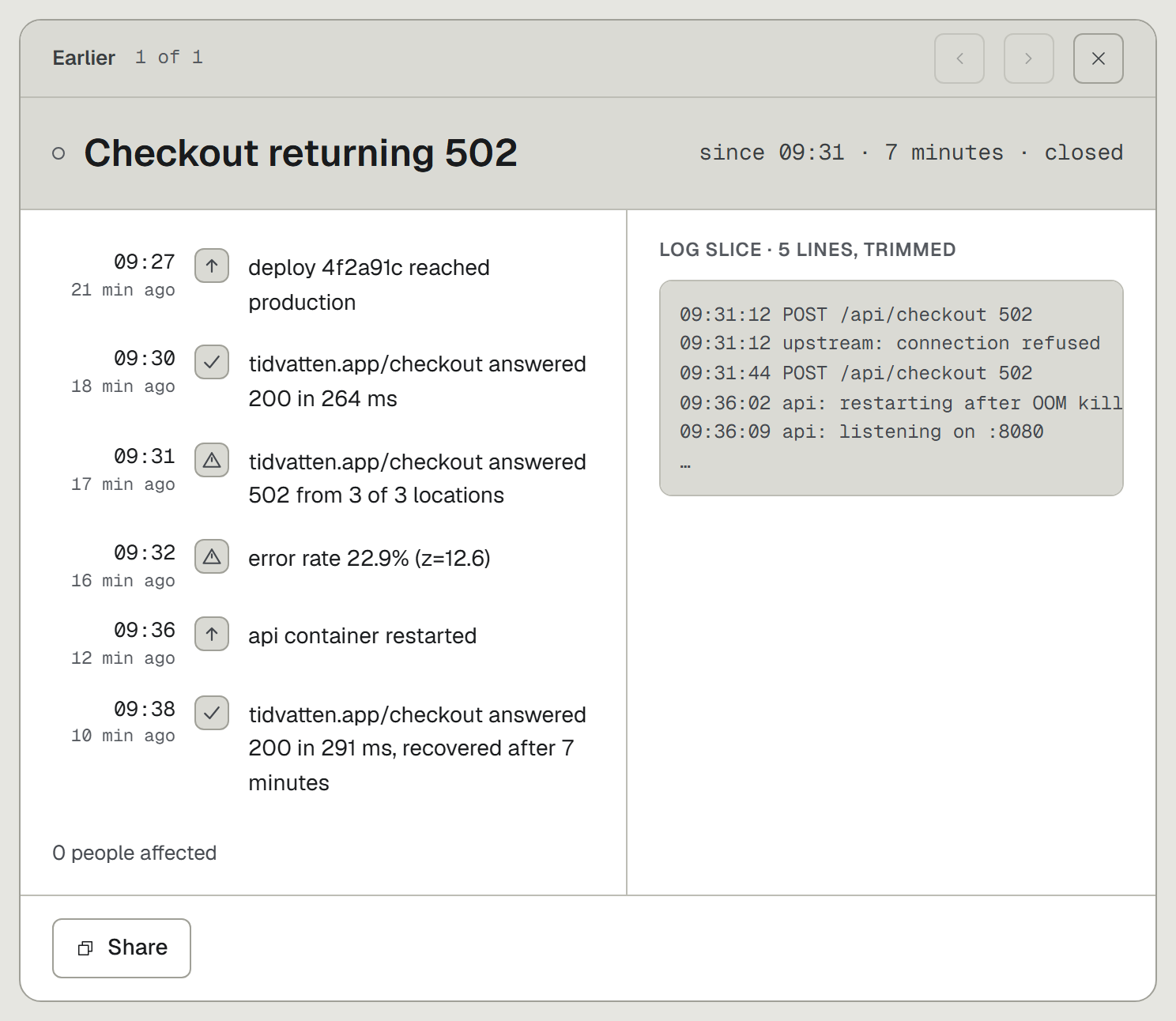
- The "why", not just "down". Uptrends tells you the page failed from three countries. UpControl correlates checks with application logs and product events, so the incident page carries the log lines around the failure and the deploy that went out before it. The alert names the check that failed; the page explains the failure.
- Your coding agent does the wiring. Run
npx upcontroland the coding agent you already use (Claude Code, Cursor, Codex, Gemini CLI, Copilot, Windsurf, Amp, Aider, Cline or opencode) wires up logging and events. Ask it to watch the checkout flow and log its runs, and the check plus the log line arrive together. No tracking code written by hand. - A status page from the first minute, free. Type a domain on the landing page and a public status page for that host exists, with components, incidents and uptime history. The owner claims it with one click. No trial clock runs on it.
- Uptime and heartbeats in one tool, and heartbeats are free. HTTP checks (every minute on paid plans), SSL and domain expiry, and heartbeats that never count toward your checks. One product watches the API the worker calls and the worker itself, and both land in the same timeline.
- Self-host the same product. The full core is AGPL-3.0, runs from one compose file on a GB-class box, and the OSS build sends no telemetry home. The hosted service is the same code and the same CLI.
Where Uptrends is better
- Transaction monitoring. Real browser monitors that log in, add to cart and check out, failing on the first broken step, with a per-step load time. UpControl checks URLs, keywords and heartbeats; it does not run click-through scenarios. If a scripted user journey is what you need watched, that gap decides this comparison.
- Checkpoints everywhere. Checks from many named locations worldwide, with per-location results and drill-down. We do not advertise checks from many named cities; the fleet checks from its regions and stores the dns, tcp, tls and wait phases per check.
- Server monitoring agents. Agents that read CPU, memory and disk on your own machines. We watch what answers over HTTP and what phones home on schedule.
- Enterprise alert plumbing. Escalation chains, maintenance windows and phone and SMS alerting, refined over two decades. We alert on Telegram, Slack, Discord and email, with no rotations and no phone escalation.
Which list pays your bills decides the answer, not the table above.
Switching from Uptrends in five minutes
- Open upcontrol.io and type your domain. The public status page exists from that moment.
- Claim the page from its link to move it into your account.
- Add HTTP checks for the URLs your Uptrends monitors covered, and a heartbeat for each background worker: a private URL the worker pings, where a miss opens an incident.
- Pick Telegram or email alerts.
- Optional, for the reason behind the next incident: run
npx upcontrolin your repo and tell your agent what to log and which events to track.