Log monitoring: what to keep and what to alert on
4 min read · published 2026-10-22
What log monitoring should include
Your product’s logs live in a file on a server you ssh into when something breaks. Log monitoring is moving them somewhere you can look before you ssh, and being told when a new error appears instead of reading everything at 2 a.m. This is what that should include, what it looks like here, and where it stops short.
- No pipeline project first. If step one is deploying a collector, sizing an ingestion and pricing a gigabyte, the setup never finishes on a small product. The lines should arrive because you ran one command or asked one question.
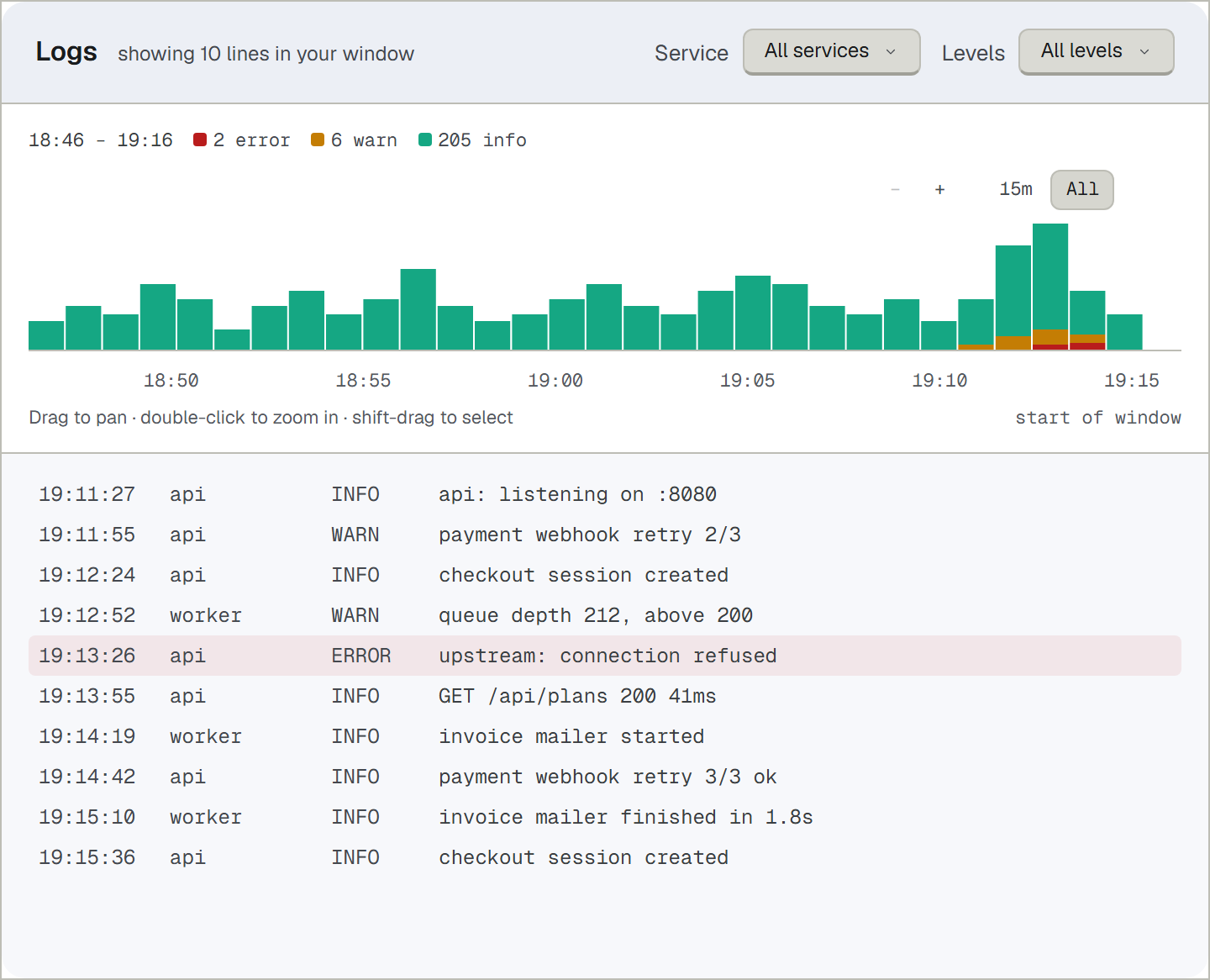
- Level and service on every line. “Error somewhere” is noise. “api, error, checkout” is a lead.
- Alerts on new errors, not on your reading. A tool that waits for you to open the panel is a slower ssh. New errors should reach the same channels the downtime alerts use.
- The logs beside the checks. A monitor says the checkout page started answering 502 at 12:04. The line your app wrote at 12:04 is the difference between knowing that it is down and knowing why.
- A stated answer for the token you will eventually log. One day a Stripe key or a Slack token lands in a line. The tool should say what happens then, not leave it to hope.
- A window you know. How much is live to scroll, how long raw lines are kept: both should be numbers on the pricing page, not a surprise during an incident.
What it looks like here
npx upcontrol in the repo hands the setup to the coding agent you already use; ten are supported, among them Claude Code, Cursor and Codex. You ask in plain language for the log lines shipped, and the agent writes the wiring. Node has an SDK, and a sender in Go, Rust or the browser writes to the same NDJSON wire with no SDK at all.
Lines arrive with their level and service in one panel. When a check opens an incident, the page carries the lines around it and the deploy, because checks, logs and events are one product here, not three tabs with three logins. A website check opens its incident after three failures in a row, titled with the cause, “Checkout returning 502” rather than “Incident #4711”.
Secrets have a stated answer. Every line passes a scrubber before it leaves your process: known secret shapes, GitHub and Slack tokens, Stripe keys and other prefixed credentials, are replaced with typed markers, and the server scrubs a second time when lines arrive. A key that leaks into a log line becomes the text “stripe-key”, not the key.
Alerts on new errors in your logs run on every plan and land where the downtime alerts go: Telegram, Slack, Discord or email.
| Plan, monthly | Live log window | Raw lines kept |
|---|---|---|
| Free | 24 hours | 31 days |
| Indie, $11 | 48 hours | 31 days |
| Growth, $24 | 7 days | 31 days |
| Agency, $49 | 30 days | 31 days |
The panel you scroll is the live window; raw lines stay 31 days on every plan, so an incident two weeks old still has its lines. Prices as of 2026-10.
Where this stops short
- If you need a year of searchable audit history, this is not that. Raw lines are kept 31 days on every plan, and no plan extends it.
- There is no tracing and no APM here. Which request failed, what the log said, how long each check phase took: yes. Spans and flame graphs: no. A product built for full observability carries those; this one is built for a small product’s 3 a.m.
- The live window is a plan axis: 24 hours on Free, a month on the largest plan.
- UpControl is younger than the decade-old incumbents and has fewer integrations, and no plan carries on-call rotations or phone escalation.
Start in five minutes
- Run npx upcontrol in the repo. Tell the agent you want your logs shipped; it writes the wiring. No collector to deploy, no ingestion to size.
- Open the Logs panel. Your lines arrive live with level and service; the raw ones stay 31 days.
- Point alerts somewhere you read: Telegram, Slack, Discord or email. New errors in the logs alert on every plan.
- Add a website check for the page those logs are about. Its incidents will carry the lines and the deploy beside them, which is the whole point.
One command and the lines start: https://upcontrol.io/?utm_source=blog&utm_medium=vs&utm_campaign=engine